Täglich bieten wir KOSTENLOSE lizenzierte Software an, die ihr sonst bezahlen müsstet!
UnHackMe 7.11 war am 31. März 2014! als Giveaway verfügbar!

Der Hauptunterschied zwischen UnHackMe und anderer Antirootkit-Software ist die Feststellungsmethode - präzises, zweifaches Überprüfen für Windows-basierte PC. Aufspüren und Entfernen aller Malware-Typen leicht gemacht!
UnHackMe wurde zunächst als Anti-Rootkit Software kreiert, doch zurzeit hilft es euch beim Kampf gegen Google Search Redirects, Rootkits, Trojanern, Hintertüren, Viren, Würmern, Adware, Spyware, Keyloggern und weitere unerwünschten Programme.
UnHackMe beinhaltet:
- Anti-Rootkit (Google Redirecting Fixer).
- Anti-Malware, Anti-Trojaner, Anti-Bot.
- Anti-Adware, Anti-Spyware.
Wichtig: Die UnHackMe GiveAway Version beinhaltet einen Antivirus-Datenbank-Updater, welcher vor jedem Scan automatisch alle Signaturen überprüft.
System-anforderungen:
Windows 2000/ 2003/ XP/ 2008/ Vista/ 7/ 8/ 8.1; 256 MB RAM; 40 MB of free disk space; Compatible with all known antiviral software
Herausgeber:
Greatis SoftwareHomepage:
http://www.greatis.com/unhackme/Dateigröße:
23.4 MB
Preis:
$34.90
Weitere interessante Titel

Die wichtigste BootRacer-Funktion ist die totale Kontrolle über Windows-Bootzeit. Das Tool beobachtet die Startup-Zeit und warnt euch falls der PC langsamer wird. Auch der Grad der Verlangsamung wird angezeigt. Das Windows mit der Zeit langsamer wird ist eine bekannte Tatsache. BootRacer steht für euch Wache und warnt bei ersten Anzeichen dieses Problems.
JustType hilft euch beim Erlernen des Blindschreibens. Das Tool benötigt keine Anpassung der Tastatur-Layouts und Sprachen und bekommt alle Daten von eurem Betriebssystem in Echtzeit.
RegRun Security Suite Platinum ist eine umfangreiche Sicherheitsoftware: 24 Tools zum Schutz gegen Rootkits/Trojaner/Adware/Spyware-Komponenten, Verbessern der Windows-Geschwindigkeit beim Hochfahren und Verwalten des Betriebssystems. RegRun Suite ist kompatibel mit allen bekannten Antivirus-Programmen und kann somit für erhöhte Sicherheit eingesetzt werden.
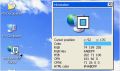
Screen Beagle ist ein Bildschirm-Tool, das euch das Vergrößern eines beliebigen Bereichs des Bildschirms sowie das Kopieren und Speichern eines Teils und das Messen des Abstandes zwischen zwei Punkten (in Pixel, Inch oder Millimeter) – und all das in nur einem Klick!
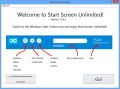
Nutzt die volle Kapazität eures Windows 8 Startbildschirms - mit Start Screen Unlimited! So könnt ihr diesem eine digitale Uhr, eine Google-Suchfunktion, Stromeinstellungen und weitere nützliche Gadgets hinzufügen. Einfach mal testen und ihr werdet nie wieder den alten Bildschirm nutzen wollen!
GIVEAWAY download basket



Kommentare zum UnHackMe 7.11
Please add a comment explaining the reason behind your vote.

One of these long winded and drawn out registration systems, requires two e-mails and even then it appeared it was registered but not activated, their words not mine!
Opened up to a simple interface with which I performed a quick scan and to my surprise it picked out programs it considered unwanted that I considered most useful.
The point of my comment is that there is no quick test of this program that can do it justice and careless use could do more harm than good.
Before I decide what to do with it I will wait in the hope that some commentators have experience with it over a longer period.

Well, I had downloaded this tool from Glarysoft site a few days ago, but what I got was just a sort of extended trial version, namely a pathetic attempt by the developer to induce users buying the main program ==> WOT (Waste Of Time)!
Today's giveaway looks like the full version of the main program, packed with the antivirus database updating function.
The main difference between this GAOTD and other antirootkit software out there concerns the detection method: UnHackMe tries to detect the hidden rookits from the beginning stages of the boot process, whereas most of other antirookit programs tries to find the rookits when they are already active.
How effective is this tool compared to other similar software out there? Honestly I don't have a clue about that, but this app can also remove Trojans, PUP programs!
So why not install it and use it for a while for FREE?
BEST FREE ALTERNATIVES
* Comodo Cleaning Essentials + Comodo Rescue Disk (==> My Personal First Choice)
http://www.comodo.com/business-security/network-protection/cleaning_essentials.php
http://www.comodo.com/business-security/network-protection/rescue-disk.php
* OSHI Unhooker (==> My Personal First Choice)
Terrific FREE APP which uses extremely complex and unique heuristics algorithms and indepth system analysis to detect and remove any kind of rootkits out there, including the unknown ones, as well as abnormal activities triggered by malware.
http://www.oshiunhooker.com/index.php
* (Portable) Kaspersky-TDSSKiller + AVZ Antiviral Toolkit
http://www.bleepingcomputer.com/download/tdsskiller
http://www.softpedia.com/get/Antivirus/AVZ-Antiviral-Toolkit.shtml
* SpyDllRemover + RemoteDLL + StreamArmor + Hidden CMD Detector
http://securityxploded.com/spydllremover.php
http://securityxploded.com/remotedll.php
http://securityxploded.com/streamarmor.php
http://securityxploded.com/hidden-cmd-detector.php
* Malwarebytes Anti-Rootkit Beta
http://www.malwarebytes.org/products/mbar
* Hidden File System Reader
http://www.eset.com/download/utilities/detail/family/173
Enjoy!! ^_^
Is this offer a life-time database update version or something like a 1-year-subscription?
Mal-ware's big business. It's used to steal money -- to steal tech, biz, & military secrets etc. -- as a means of covert warfare -- and to steal the use of your PC &/or tablet &/or cell... while they can't, or don't use them for the more complicated bitcoin mining, armies of cell phone bots are being used for mining other crypto currencies. Companies or groups like Vupen specialize in finding vulnerabilities that they sell to the highest bidder -- often government agencies, but it's said not always, particularly with similar firms perhaps suspected of having a much more mercenary nature. There's one company that, after paying a very high price for a subscription, lets you browse biz & gov systems, networks, & servers worldwide, viewing their characteristics & vulnerabilities. One Kaspersky blog speculated that in the near future a biz would almost have to hire mercenary hackers, just to stay competitive with their biz rivals, assuming those rivals would have already hired their own hackers.
http://en.wikipedia.org/wiki/Vupen
http://www.zdnet.com/nsa-purchased-zero-day-exploits-from-french-security-firm-vupen-7000020825/
http://www.forbes.com/sites/andygreenberg/2012/03/21/meet-the-hackers-who-sell-spies-the-tools-to-crack-your-pc-and-get-paid-six-figure-fees/
.
A rootkit is often part of more effective mal-ware used to gain & keep access to a system, & often ultimately a network or networks. In a nutshell it hides from Windows so it's in effect invisible. The rootkit that caused quite an uproar several years ago, because it came from Sony as DRM, altered Windows Kernel -- http://searchenterpriselinux.techtarget.com/definition/kernel . *Maybe* more common are rootkits that masquerade as drivers, so they're loaded first when Windows starts. *I think* the root kits that *may* be the most difficult to find & fix are those that add themselves to the 1st, hidden track on a hard drive, so their code is executed [started] the moment the system's turned on & reads the hard drive. What they have in common is that they tell the Operating System that the files making up the mal-ware don't exist
http://en.wikipedia.org/wiki/Rootkit
" Removal can be complicated or practically impossible, especially in cases where the rootkit resides in the kernel; reinstallation of the operating system may be the only available solution to the problem. When dealing with firmware rootkits, removal may require hardware replacement, or specialized equipment."
.
Will UnHackMe help? Maybe -- maybe not. There's no such thing as as 100% protection, particularly when it seems gov agencies -- not just the NSA -- managed to insert backdoors into software & firmware. Just as some bad guys [e.g. some of the Mexican cartels] have at one time been military, learning their skills that way, it's reasonable to expect some people leave gov intelligence agencies, putting what they've learned to use for their own personal gain.
Bearing that in mind, You have to balance they amount of time & computing resources you want to devote to security -- all software uses some resources, and running it, either constantly or on-demand, takes some time & effort. The software companies selling security software of course all say their products have little or no effect, but that's kind of like the ads that say all I need to do is take some pill & I'll lose 50-100 pounds. The more thoroughly your security software monitors things, & the more layers of security software you have, the more time you'll lose due to false positives. The companies writing & selling security software simply cannot know of every exploit, and if they don't know about it they can't include detection or protection in their pattern files. So they also base detection on behaviors, e.g. UnHackMe warning you that something wants to change a file on reboot or restart -- in that case the software may be legit, or not.
In case it's useful to you...
Emsisoft Emergency Kit http://www.emsisoft.com/en/software/eek/
http://www.techsupportalert.com/content/probably-best-free-security-list-world.htm
http://www.techsupportalert.com/best-free-rootkit-scanner-remover.htm
.
Edit : as it was installed (in demo mode) tried it. Bad interface, nothing special - Spybot or CCleaner do same and much more.
Now having problems uninstalling it...
iPhone Angebote »





Android Angebote »





Läuft tadellos und zeigte mir gleich beim ersten Neustart vermeintlich gefährliche Programme auf; Programme, die Unhackme offenbar einfach nur noch nicht kannte und daher prophylaktisch zunächst als potentielle Gefahr hervorhob. Doch über den Button mit dem grünen Blatt 'False/Reight' (rechts) lässt sich das jeweils angezweifelte Programm "legalisieren" und gut ist. Schade nur, dass alles auf Englisch ist, daher eher etwas für User, die genau verstehen, was das Programm tun, bzw. tun will, wenn man es lässt.
Save | Cancel
Cave! Hohes Potential das System zu zerschießen. Was unhackme alles als 'unbekannt' bezeichnet und zum Löschen vorschlägt sind auch etliche Treiber, Programmdateien u.a.
Das GUI mit den vielen Untermenüs macht es auch nicht übersichtlicher.
Fazit: im Grunde eine gute software, aber mit Vorsicht zu genießen.
Save | Cancel
Endlich ein Programm, wo man Programme, welche ich als absolut nutzlos und ständig belastend empfinde (bing, ask)mühelos eliminieren kann.
Fehlt direkt noch auf filepony - zumindest am Giveoftheday-Tag.
Aufpassen muss man beim löschen schon - es wird eben alles aufgelistet.
Save | Cancel
Ach ja: Da ich die Version 5 bereits seit einiger Zeit auch aus dem Giveaway laufen hatte, die ich vor der Installation entfernen musste, darf ich jetzt wieder eine Stunde mit dem Restore verbringen.
Vielen Dank für die Mühe, die Sie mir machen.
Save | Cancel
Der zugesendete Aktivierungscode wird nicht akzeptiert "invalid activation code. Click "get activation key" button. Sinnigerweise komme ich dann auf die Seite umdas 1-Jahres-Abo für 14,28 € zu kaufen.
Was soll der Mist?
Save | Cancel
UNHACKME hat es geschafft, endlich meine MISTPROGRAMMRESTE zu löschen und mich von diversen Schädlingen wie Läuse, Motten und Flöhe zu befreien... ;-)
Mal ehrlich, klasse Programm, wer´s nicht versteht, brauchts doch nicht runterladen. Ist halt a bisserl komplizierter, nix für Anfänger der Schädlingsbekämpfung... :-)
Save | Cancel
Achtung! Das ist ein russische Programm. Ich habe gleich deinstalliert - hoffentlich kein Trojaner erwischt.
Save | Cancel
Kann ich nicht empfehlen: Einige blinde Alarme, unklare Menues mit z.T. fehlenden Beschriftungen des Buttons und eine unsaubere Deinstallation, die Leichen im Dateisystem und in der Registry hinterlässt.
ZUm Updaten der Signaturen: Das scheint nur mit der Pro-Version zu gehen, insofern ist das "Giveaway of the Day" (was ja irgendwo kostenlose Software vorgaukelt) wenn überhaupt dann eh nur zeitnah sinnvoll, da man es nicht kostenlos auf den neusten Stand der zu entfernenden Schadsoftware bringen kann.
Save | Cancel
Zuerst mal Kompliment an hbhde, das ist ein Kommentar mit dem man was anfangen kann und unterscheidet sich wohltuend von den vielen hier üblichen Schrott-Kommentaren.
Dagegen gehen mir die laufenden Viren-Meldungen kräftig auf den S..ck.
Ganz besonders beim Bitdefender und seinen laufenden Fehlmeldungen, deshalb habe ich ihn rückstandslos von meinem PC entfernt
Hier bitte zum 10 mal. Wenn Ihr Euren Virenscanner, Firewall und Ähnliches zu scharf einstellt läßt er keinerlei Änderungen an Registry zu. JEDES Programm aber führt bei der Neuinstallation an der Registry eine Änderung durch. Wenn es das nicht kann misslingt die Installation und oder es kommt eine Viren-Warnung(der Bitdefender hat es da immer besonders eilig). Und dann geht hier das Geheule los Programm läßt sich nicht installieren, ab in die Tonne.
Ein Weiser hat mal gesagt: Das größte Übel ist nicht der COMPUTER sondern DER der davor sitzt.
Und recht hat er.
Save | Cancel
Das Programm verfügt über einige interessante Ansätze zur Entdeckung von Malware.
Falls der Software-Hersteller selbst eine vertrauenswürdige Zertifizierung besitzt,
könnte er ein ständiger Software-Schützer meines Computers werden.
The program has some interesting approaches to the discovery of malware. In case the software maker itself has a trusted certificate, it could be a permanent protector of my computer.
Save | Cancel
Mal Ehrlich;Ich will ja nicht meckern,aber...das ist ja wohl eine Schweinerei.Ich hatte hier mal die 5...Version gezogen und die konnte man immer updaten.Was nützt mir diese Version,wenn ich sie nicht updaten kann,bevor ich nicht ein Premium Jahresabo für 12 Eoronen gekauft habe??Das ist eine große Frechheit.Ab in die Tonne
Save | Cancel
chiro909
Reviewing 5.0 (Feb 7, 2009)
This program caused so many problems for my machine its unreal!
First of all, when I tried to uninstall it via add/remove, it wouldn't do it!
Secondly, when I tried to search for it manually, it wouldn't show up anywhere! I found out that it was a hidden folder!? Why would this be a hidden app let alone the entire folder?
I am running Vista 64bit and it was fine until I got this program, it took me 8 hours of multiple rollbacks to get my system back to semi-normal state.
Don't use this junk. You'll regret it.
Save | Cancel
"UnHackMe wurde zunächst als Anti-Rootkit Software kreiert, doch zurzeit hilft es euch beim Kampf gegen Google Search Redirects, Rootkits, Trojanern, Hintertüren, Viren, Würmern, Adware, Spyware, Keyloggern und weitere unerwünschten Programme."
Also eine eierlegende Wollmilchsau!
Komisch, dass renomierte Hersteller von Antivirenprogrammen so was nicht auch im Programm haben.
Save | Cancel
@ melly
"Dieses Programm hat uns bei inzwischen drei PCs die Neuinstallation erspart, wo alle andere Anti-Trojaner-Programme kläglich versagten."
Das glaubst du doch selber nicht!
Save | Cancel
Ich habe es nicht hinbekommen, die Signaturen upzudaten.
Scheinbar hat man dazu nur 1 Chance, und wenn dann die Firewall blockiert, kann man das Tool nie wieder updaten.
Save | Cancel
Na bestens. Folgende Meldung von Bitdefender:
Gen: Variant.Symmi.23691
Save | Cancel
googelt man "UnHackMe" kommt als erster Treffer "www.windowstechies.com/spyware", wo gewarnt wird vor diesem gefährlichem, bösartigen Programm. Natürlich wird auch Hilfe angeboten, in Form eines Programms mit dem Namen "SpyHunter". Das ist clever, denn tatsächlich werden hier die Dinge verdreht um wirklich an ihre Daten zu gelangen.
Auflösung:
während "UnHackMe" unbedenklich und wirklich hilfreich für ihren PC sein kann, infizieren Sie sich mit der angeblichen Hilfesoftware "SpyHunter" den wirklichen Schädling!
Save | Cancel
Hallo,
leider kann ich das Programm erst garnicht installieren.
Sowie ich auf das Setup klicke und sich der KeyWrapper öffnet sagt er einem:
"Failed to launch program."
Antiviren software habe ich auch mal ausgemacht. Problem blieb trotzdem.
Gruß
Jan
Save | Cancel
Der Hauptunterschied zwischen UnHackMe und anderer Antirootkit-Software ist die Qualität. Oder warum haben die meisten user weltweit
andere Antirootkit-Software installiert? Nicht geschenkt und vielen Dank!
Save | Cancel
Dieses Programm hat uns bei inzwischen drei PCs die Neuinstallation erspart, wo alle andere Anti-Trojaner-Programme kläglich versagten.
Eigentlich dachten wir uns durch Anti-Viren-Programme, Firewalls, Verschlüsselungen, regelmässige Sicherheitschecks, Updates und Vorsicht etc. bislang gut geschützt.
Danke für das Giveaway.
Save | Cancel
schätze, das wird Kommentare geben, weil einige mit der engl. Installation nicht klar kommen.
Download und Installation, es erscheint das bekannte giveaway Fenster mit der Überschrift --Sucessfully activated--, aber im Fenster steht :
---To activate your free copy visit: http://...---
Das versteht man dann so;
will man diese Software aktivieren, soll man die genannte Seite besuchen, wo man seine email Adresse + Namen hinterlegt, und auf die relativ schnell kommende Bestätigungsmail einen --Free Licence Key-- bekommt.
Nun denkt jeder, ok, mit diesem Key registriere ich die Software, und aktiviere sie dadurch.
Registrieren mit dem Key klappt, aber in der email heisst es,
das man lediglich mit dem key die Registrierung vornimmt, aber nicht die Aktivierung.
---Attention!
Your key is only for registering your software, not for activating!
Activating subscription gives you the additional features:
1) One year of free updates.
2) Help in removal.
3) Technical support.
You will get an activation key after purchasing the subscription:
https://secure.payproglobal.com/orderpage.aspx?products=149450
Your key is valid only for the version, downloaded from GiveAway web site.
Do not use the key for a trial version of UnHackMe!---
soll heissen, der Softwarehersteller benutzt den Begriff Aktivierung dafür, dass nachdem man die Software mit dem Key Freigeschaltet hat, man einen zusätzlichen Premium Service kaufen kann, um den freizuschalten, wird der Begriff Aktivierung verwendet,
für die von giveaway Nutzern verstandene Aktivierung, verwendet der Hersteller den Begriff -Registrierung-.
Save | Cancel