Täglich bieten wir KOSTENLOSE lizenzierte Software an, die ihr sonst bezahlen müsstet!
Giveaway of the day — Smart Audio Editor
Smart Audio Editor war am 17. Juni 2009! als Giveaway verfügbar!
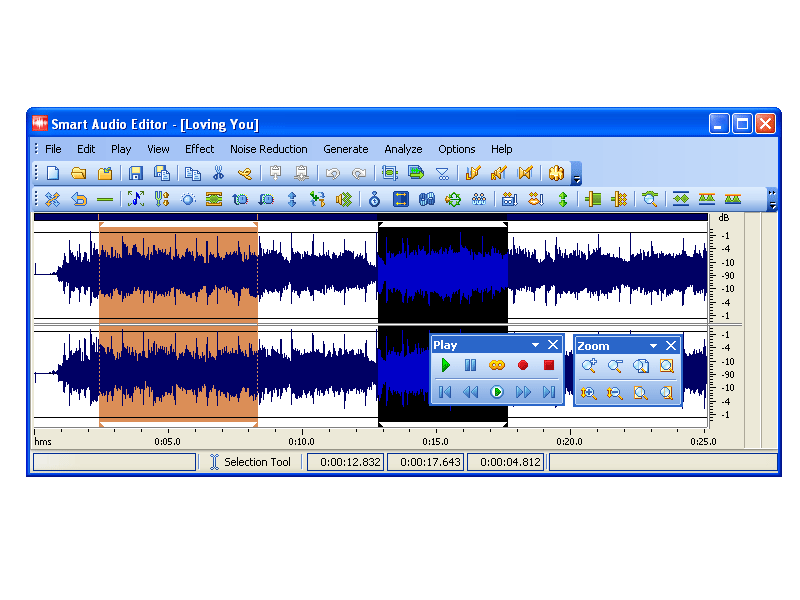
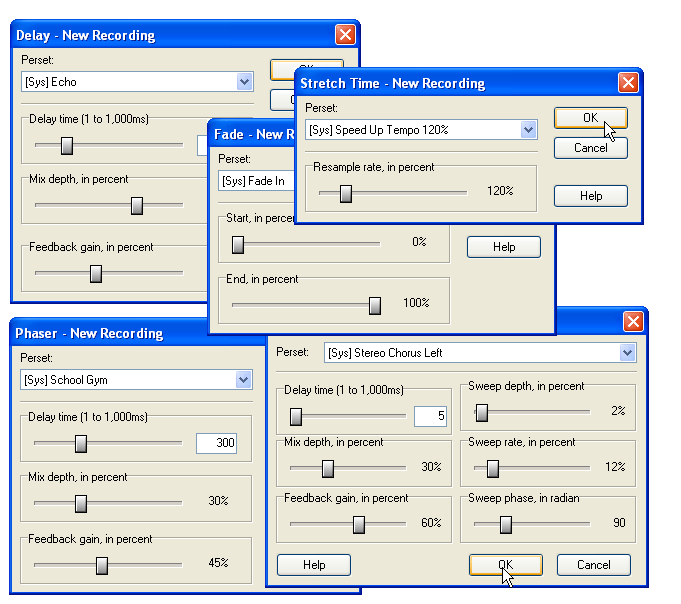
Smart Audio Editor ist ein vollfunktionales Programm zum Editieren von Audiodateien welches euch eine Vielzahl an Bearbeitungsmöglichkeiten bietet. Funktionen wie Aufnehmen, Mixen, Editieren, Analysieren und Hinzufügen von Spezialeffekten sowie das intuitive, benutzerfreundliche Interface sprechen für sich. Darüber hinaus bietet das Programm mehrere hervorragende Spezialeffekte und Tools zum Konvertieren von Audiodateien in unterschiedliche Formate inklusive MP3, WMA, WAV, Ogg Vorbis etc. Ob beim Gestalten von Webseiten, PowerPoint Präsentationen oder Flash Animationen - Smart Audio Editor trägt zur Qualität eurer Arbeit bei!
System-anforderungen:
Pentium: 166 MHz; 64 MB RAM Minimum; Windows 98/Me/NT/2000/XP/2003; MME-compatible Soundcard; Graphics: 256 colors, 800 x 600
Herausgeber:
SmartAudio SystemsHomepage:
http://www.smartaudioeditor.com/Dateigröße:
7.49 MB
Preis:
$29.95
GIVEAWAY download basket




Kommentare zum Smart Audio Editor
Please add a comment explaining the reason behind your vote.

[installed quickly and easily on Windows Vista Home Premium x64]
Quite a useful program. has a lot of great features, for example 'noise reduction' and 'reverse'.
The interesting thing about this program is that it is exactly the same as a program called "Free Audio Editor"
http://www.free-audio-editor.com/
the only difference I have found is quite obvious; the GUI has completely reworked to fit the 'new' Microsoft Office look and feel. That and the price is apparently $29.95.
In my opinion, "Free Audio Editor" is slightly easier to use, better looking, and has a learning curve of zero.
so for those of you that may miss this giveaway, you can pick up its twin at http://www.free-audio-editor.com/

#6 and others who say Audacity is better should look closer at this program. I only looked it over for a few minutes and found things that Audacity doesn't have one of which being the number of output formats, another being able to play in loop, and another being able to change from Waveform to Spectral mode. These are but a few of the differences.
I have just about every form of music tools from Audacity to Cakewalk and I'm sure this program would be a great add on to compliment the others. No one program has it all, so to say one is better over another is ridicules. Another nice thing about this freebie is if you have to re-format you can still re-install it. DID YOU GET THAT? You can still re-install it according to the install directions, just save the program installer and read me file.
For the basic home user this program is rated five stars by Tucows,and a couple of editors choice awards for non-professional use. http://www.smartaudioeditor.com/reviews.htm Let's face it, if you're a pro you're going to shell out some big bucks for higher end programs so to bicker over free to $100 programs is useless.
This is a nice piece of software. It's pretty much Audacity but with a cleaner user interface and a few interesting additions (frequency analyzer, etc).
I've been checking the GOTD site daily for over a year, & they've had more than a few audio apps -- Smart Audio Editor is by far the best one I've seen them offer. Don't get me wrong -- if you spent $800 on Cakewalk you're not going to even think about downloading today's GOTD -- but for most audio editing this easy to use program should fill the bill nicely.
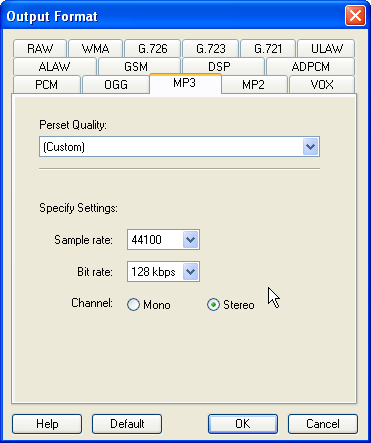
What makes Smart Audio Editor different is that while it uses NCT code libraries like some other apps, you have much better control over the filters & FX, making them very usable, yet not so complicated that you have to take classes to learn how to use them. You have the usual output choices [settings under Options -> Output Format]. The Noise Reduction isn't the same thing found in usually higher end apps, where a snapshot's taken of silence & then subtracted from the audio, but that's something you can easily get into trouble using too much anyway.
The program itself is small, with 76 files [mostly multi-lingual presets] in 2 folders taking up ~ 6 MB. I mentioned the NCT libraries, & there are 13 of these files destined for Windows' System32 folder. When it comes to Windows' Registry, there are quite a few entries but almost every one of those is under the program name: HKCU\Software\SmarAE7.7.1, so it shouldn't cause any problems.
Alternatives... Please bear in mind that while audio software can be quite specialized, there's a lot of feature overlap -- a multi track program might be designed to let you mix several tracks, but still let you use most filters and do quite a lot of editing.
If you want to do original music recording &/or creation, you'll probably want to use plugins for FX that dramatically alter the sound. VST plugins allow you to do that & more, & there's quite a few free ones available [search "vst" & you'll find vst plugin databases on-line]. You'll also want software that uses VST plugins like the free Wavosaur.
If you want to get original, but not *that* original, head over to acidplanet.com. Acid is music creation software that uses loops, comes in 3 versions -- free, home, & pro (that really is pro) -- and allows editing. Acid Planet has free loops to get you started, & an active community.
Some have asked about combining files... Usually you don't -- you mix tracks, where each track has a different file on it. In a nutshell multi-track audio software is a version of those huge mixing boards you see in pictures of recording studios, & yes you can normally add filters & do some editing. From videohelp.com: "Traverso DAW is a GPL licensed, cross platform multi-track audio recording and editing suite..."
Finally, while some of the big name audio software still can cost thousands of dollars, more & more companies are starting to release scaled down packages, including for the home enthusiast. On sale, & with rebates & such you can find these intro level -- but still very capable -- apps from $0 - ~$75.
Downloaded fine on Vista HP 32-bit OS, and it appears to be compatible with the Vista OS environment, although this is not one of the listed supported systems in the GiveAway specifications.
Received Microsoft Register error message during install process, but the installation completed anyway despite this bump in the road.
Registration also proceeded smoothly, after which I exited and then re-accessed the program easily, with no problems.
Program has a pleasant, easy-to-read and understand user interface, with a full-featured Help Menu containing detailed, step-by-step guidance on how to use the program.
Audio conversion formats supported include: G.721, G.723, G.726, ALAW, ULAW, GSM, DSP, ADPCM, MP3, WMA, OGG, MP2, VOX, RAW, WAV.
It looks like a good program. Thank you GOTD team.
A freeware alternative is: WavePad Sound Editor, which may be downloaded at: http://www.nch.com.au/wavepad/index.html
iPhone Angebote »





Android Angebote »





Moin! Das ist sicherlich ein schönes Programm doch fehlen mir nach einem ersten Probelauf ein paar wichtige Kleinigkeiten: Wenn man eine Datei bearbeitet hat und das Programm schließt, kommt keine Sicherheitsbafrage, ob man speichern möchte. Wenn eine Datei geladen ist, gibt es keine Möglichkeit - wie bei vielen anderen Programmen - mit der Leertaste das Abspielen zu starten bzw. zu stoppen. Das ist ärgerlich, muß man immer erst die entsprechenden Schaltflächen per Maus anklicken. Größtes Manko ist für mich, daß man die Effekteinstellungen nicht vorhören kann. Das ist letztlich nicht praktikabel, imme erst auf Verdacht anwenden, dann Retur und neue Einstellungen testen. So trotz allem... Daumen runter.
Save | Cancel
Wer lediglich weiß, daß es mp3-files und CD-audio-files (audio-mode 1+2 usw) gibt, kann damit Musik und Sprache genauso hören, wie jemand, der bloß weiß, daß ein Klavier aus schwarzen + weißen Tasten besteht: auch das reicht um zuhören zu können.
Er sollte nur nicht noch versuchen einem Pianisten Ratschläge zu erteilen:
Die hier vorgestellte audio-editor ist phantastisch in seinen Möglichkeiten, wenn man in die software eintaucht: Toll
Wer nur audio-files in wma oder mp3 konvertieren will sollte schnell umblättern. meint
smea
Save | Cancel
extra eine Firma für diese Softwar gegründet? kaum vorstellbar
Save | Cancel
Echtzeitvorschau für die Effekte?
Save | Cancel
Installation auf XP nicht erfolgreich!
Installation zwar an sich abgeschlossen, das Programm öffnet sich aber nicht, lediglich ein splash screen ist kurz zu sehen, dann rührt sich nichts mehr....
Registrieren ist also gar nicht möglich.
Save | Cancel
@1: Vielleicht weniger oft abstürzen? Wäre zumindest wünschenswert.
Save | Cancel
kann nix,was nicht auch Freewareprogramme in unserer Sprache können!Ausserdem gabs kürzlich Audio Editor deluxe mit mehr Funktionen als das hier!!!
Save | Cancel
Wir hatten doch schon 2 Stück in den vergangenen Wochen. Also einen dritten installiere ich mir nicht.
Save | Cancel
Und was kann das Programm, was das kostenlose Audacity nicht kann?
Save | Cancel
Smart Audio Editor ? Vor paar Tagen gabs erst den Audio Editor Deluxe !Nu schon wieder eine verkrüppelte Version?Heutiges Programm mit den wenigen Funktionen gibt es auch in Deutsch und als Freeware.
Save | Cancel