Täglich bieten wir KOSTENLOSE lizenzierte Software an, die ihr sonst bezahlen müsstet!
Giveaway of the day — Screen Beagle Pro 1.72
Screen Beagle Pro 1.72 war am 22. März 2018! als Giveaway verfügbar!

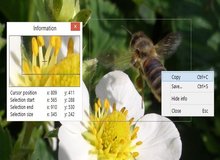
Greatis Screen Beagle ist ein ungewöhnlich raffiniertes, fortschrittliches Dienstprogramme-System für eueren Bildschirm, das vier integrierte, leistungsstarke Unterprogramme enthält:
- Bildschirmlupe
Ein ausgeklügeltes Bildschirm-Anzeige-Fenster, das zwischen 50 und 300 Pixel groß sein kann und euch x2 bis x10 Zoom bietet. - Screenshot
Ein fortgeschrittenes Screenshot-Dienstprogramm, das entweder den Bildschirm oder einen ausgewählten Teil des Bildschirms entweder in die Zwischenablage oder in eine BMP-, GIF-, PNG- oder JPG-Datei kopieren kann. - Vermesser
Dieses einzigartige Dienstprogramm kann Entfernungen und Winkel zwischen zwei beliebigen Punkten auf dem Bildschirm messen. - Pipette
Dieses nützliche Dienstprogramm kann die Farbe eines beliebigen Pixels auf dem Bildschirm erfassen, es in Textformate (RGB, REG Hex und HTML) umwandeln und diese Textdarstellungen anzeigen oder in die Zwischenablage kopieren.
Jedes dieser Hilfsprogramme kann durch einen Mausklick auf das Tray-Icon, durch anpassbare Hotkey-Taste oder durch ein Popup-Menü im Tray-Icon aktiviert werden. Nach der Aktivierung werden die Bildschirminhalte eingefroren, um die Analyse der Kurzzeitzustände zu vereinfachen.
Screen Beagle verwendet standardmäßig ein einzelnes Tray-Symbol, auf das ihr mit der rechten Maustaste klicken könnt, um eines dieser Dienstprogramme zu aktivieren. Wenn ihr eine intensive Bildschirmarbeit leistet, kann Screen Beagle separate Symbole für einzelne oder alle separaten Dienstprogramme anzeigen. Dies ermöglicht einen schnellen Zugriff mit einem einzigen Klick.
System-anforderungen:
Windows XP/ Vista/ 7/ 8/ 8.1/ 10
Herausgeber:
Greatis SoftwareHomepage:
http://greatisprogramming.com/utilities/screenbeagle/Dateigröße:
518 КВ
Preis:
$19.00
Weitere interessante Titel
BootRacer ist ein leichtgewichtiges, einfach zu bedienendes und bequemes Tool zum Überwachen der Windows PC-Startzeit und zum Steuern von Startprogrammen. Der Hauptansatz von BootRacer ist die Möglichkeit, eine Benutzerpasswort-Timeout-Zeit von der berechneten Summe auszuschließen. Premium erwerben
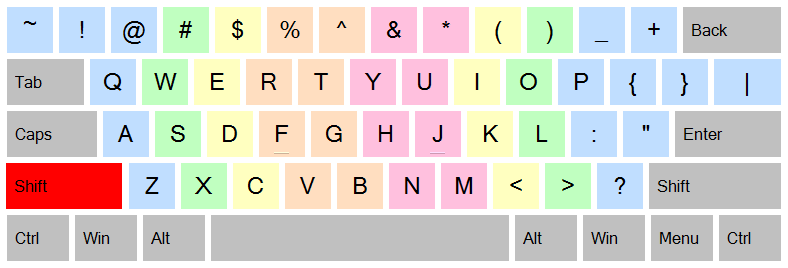
JustType - Bildschirmassistent für die Blindeingabe. Es wird euch helfen, mit dem Tippen ohne Tutoren vertraut zu sein. Ihr werden sofort los schreiben ohne zu lernen, wie es mit den üblichen Tastatur-Tutorenpogrammen der Fall ist. JustType zeigt die Bildschirmtastatur an, deren Tasten zu jeder Zeit genau die gleichen Zeichen anzeigen, die im Text erscheinen, wenn ihr die Taste auf eurer echten Tastatur drückt.
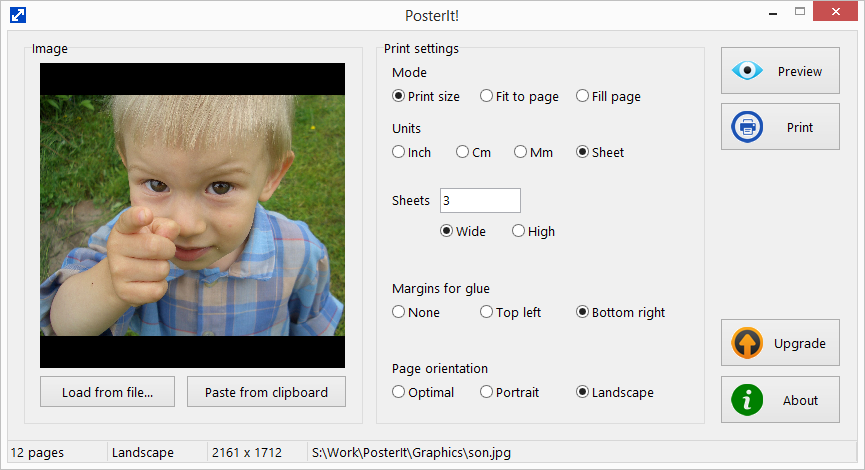
Druckt eure Fotos und Bilder auf mehreren Seiten mit PosterIt! PosterIt! ist ein Bilddruck-Dienstprogramm, mit dem Fotos, Kunst, Poster, Schemata, Diagramme, Diagramme, Karten und so weiter mit unbegrenzter Größe auf jedem Drucker gedruckt werden können.
RegRun Suite ist eine komplette Computersicherheitssoftware. RegRun Platinum umfasst 24 System-Utilities zum Schutz eines Computers gegen Rootkits / Trojans / Adware / Spyware-Komponenten, Erhöhung der Windows-Boot-Prozess Geschwindigkeit sowie Hilfe bei der Computer-Verwaltung.
UnHackMe beseitigt verschiedene Arten von bösartiger Software: Suchumleitung; Pop-Up Werbung; Potenziell unerwünschte Programme (PUP); Unerwünschte Prozesse; Langsames Browsen; Rootkits; Trojaner; Spyware; Keylogger.
GIVEAWAY download basket


Kommentare zum Screen Beagle Pro 1.72
Please add a comment explaining the reason behind your vote.

I had all of these tools as freebies back in the day of Windows 95 so nothing unique or new here folks but as they no longer work on more recent versions I am pleased to have this thank you.

Mike, we still working on this program, but the version developed for 95 still works under all latest Windows releases (of course, we adapt it a little, rebuild and test for each new Windows)... "Did not break - do not repair," my grandma said. :)
Not quite sure yet what the difference between the pro version and the free version. One problem that showed itself, is that when you click to open the tray and start the program, the tray remains open thus creating a situation that a part of the screen is covered by the tray and if the section under the tray is the section you wish to save is covered it cannot be copied.
THANK YOU!!! I had been looking for a really easy screen capture utility so I could save some things from my husband's facebook page for a scrapbook (he passed away a few months ago) and hadn't found anything that was really fast and EASY. Thank you for the perfect solution! It downloaded, installed, and I was up and running in just minutes. Very intuitive, didn't have any problems making it do exactly what I needed. Found I did have to remember to close the utility after making a screen capture, to unfreeze everything else, but no biggie as I'd be closing it anyway after a screen capture. Finally, another roadblock gone, and I really appreciate it, life is difficult enough!
Screen Beagle Pro was easy to install and easy to use. However, it does not appear to be able to handle multiple screens. It only works on the screen identified as the primary. All functions that I tried, Capture, Magnify, and Measure only work on the primary screen. When trying to use on the secondary screen it still only "sees" the primary. It would be great to see multiple screens incorporated into this very useful tool.
iPhone Angebote »





Android Angebote »





Da ich kein Facebook-Konto habe, gebe ich meine email-Adresse an, um einen Link zu bekommen. Das klappt aber nie. Wieso? MfG H. Klemm
Save | Cancel
Dafür gibt es PickPick - für den Heimanwender kostenlos, deutsch, sehr übersichtlich und einfach zu bedienen: http://ngwin.com/picpick
Und wer sein tool als ungewöhnlich raffiniertes, fortschrittliches Dienstprogramme-System anbiedert, hat wahrscheinlich den Knall nicht gehört.
Save | Cancel