Täglich bieten wir KOSTENLOSE lizenzierte Software an, die ihr sonst bezahlen müsstet!
Giveaway of the day — Easy Drive Data Recovery 3.0
Easy Drive Data Recovery 3.0 war am 13. Mai 2014! als Giveaway verfügbar!
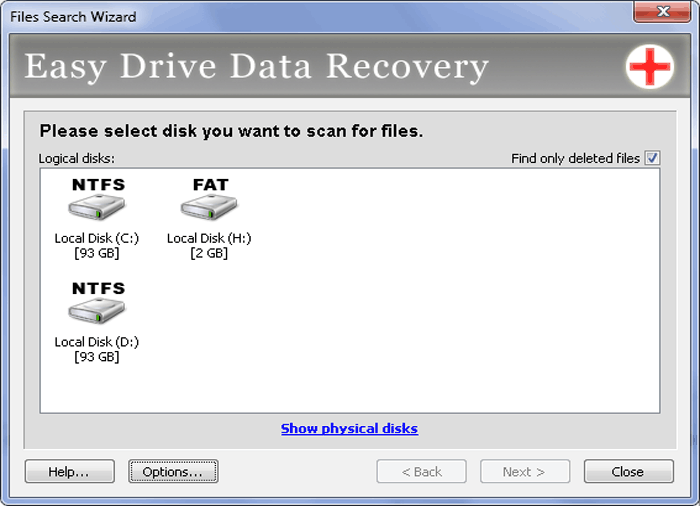
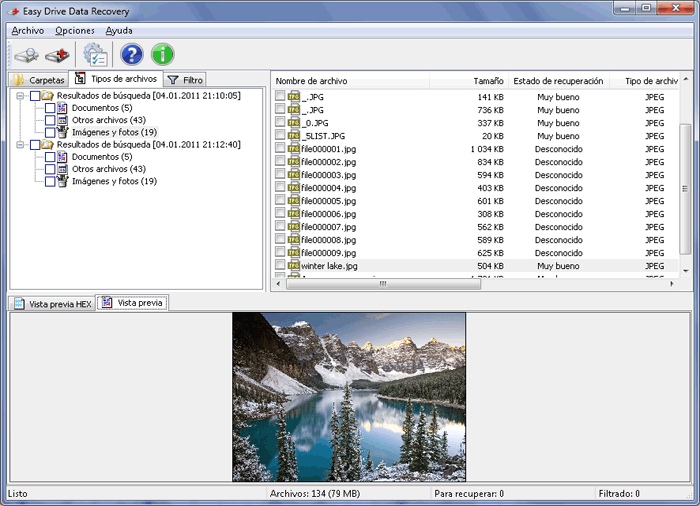
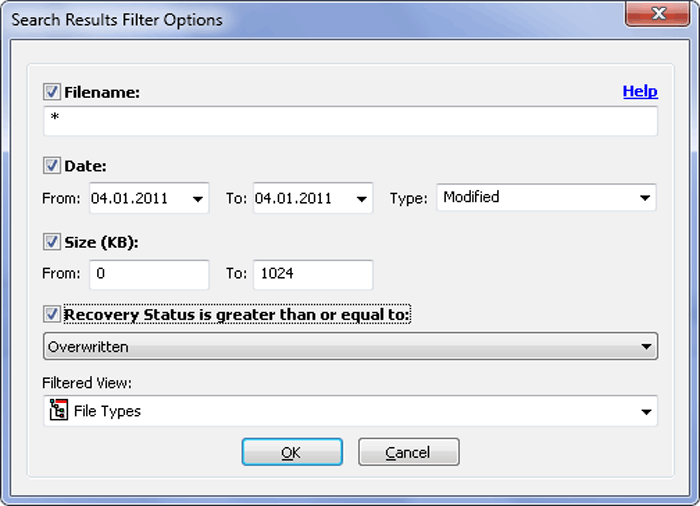
Easy Drive Data Recovery ist eines der besten Programme aus dem Hause MunSoft. Es ist in der Lage, Datenrettung auf Festplatten, Speicherkarten, Wechsellaufwerken und anderen Geräten durchzuführen. Das Programm kann eine formatierte Festplatte wiederherstellen und Dateien über hundert verschiedener Formate retten. Daten retten von Festplatte mit FAT- und NTFS-Systemen wird unterstützt.
Das Tool hilft beim Finden und Wiederherstellen von Dateien in mehr als 90 Formaten, darüber hinaus bekommt ihr die Vorschaufunktion und etliche Filteroptionen.
Um eine persönliche Lizenz (inklusive alle Updates und Support) mit 70% Rabatt zu kaufen, folgt bitte diesem Link. Beim Interesse an einer Business- bzw. Service-Lizenz schreibt uns bitte eine Mail an sales@munsoft.com.
System-anforderungen:
Windows 8, 7; Vista, XP, NT/2000; /2003/SBS2003; Supported languages: English, Russian, French, Portuguese, Spanish, Italian, German, Turkish
Herausgeber:
MunSoftHomepage:
http://www.munsoft.com/EasyDriveDataRecovery/Dateigröße:
17.1 MB
Preis:
$59.95
GIVEAWAY download basket




Kommentare zum Easy Drive Data Recovery 3.0
Please add a comment explaining the reason behind your vote.

Tested this when given away before: Not bad... If there were no better tools around! "Found" too many trash instead otf the real files (see below).
For a friend of mine recently had REAL crash, I was able/forced to do full tests on more than a dozen recovery tools under realistic circumstances:
1 TB HD, lost a big 858 GB NTFS partition with many lost/overwritten sectors at the beginning of the partition sectors (I guess trough either a faulty program, or playing around with boot managers).
It was unaccessible, though still had a boot sector and held (before...) some 100.000 files(!).
FIRST REMARK:
NO ONE could EVER test ALL conditions and NO APPLICATION can say to be the best for ALL scenarios! there are too much possible errors around ... But what I CAN say after years of experience is:
1. to recover accidental deleted files, most of the well known programs WILL do.
2. on complex and almost complete destroyed drives it depends on what you are looking for:
- simply looking for KNOWN lost files or file types there will work a bunch of tools rather fine (see other tests and suggestions of serious magazines and blogs)
- to recover as much as possible even under worst circumstances, included as much as possible of the folder structure - I found only two programs worth to work with:
a) EASEUS_Data_Recovery (free to recover up to 2 GB of data...)
b) Auslogics File Recovery 3 (many giveaways of limited number of licenses an a general giveaway by 'Downloadcrew' 3 years ago)
ONLY those tools delivered BEST results considering ALL my(!) - important criteria:
- number of found files (found equal or MORE than 'big' companies´ tools...)
- Folder structure (all 'big' companies´ tools failed on this!)
- reliable results (many giveaway delivered MUCH more fake/useless files...)
- number of correct names of the files (MUCH better than any other solutions!)
- possibility to preview found files
- both could sort all result by any given criteria
o EASEUS_Data_Recovery was slightly better in the number of found files at the FOUND scenario
o Auslogics FileRecovery 3 brought very similar results with some (not much) less files found and some (not much) truncated file names (seemingly files with mor tha 1 dot and spaces in its original names...)
A 2nd disadvantage: Auslogics automatically created an additional long folder path:
X:\PhysicalDrive3\Lost Partition (NTFS, 858 GB)\" which could become a (minor) additional problem as for reading in too long filenames (some prgrams may fail on this...).
BUT now the clue:
when I deleted the bootsector as well just for do testing again (could easily happen in real scenarios!!) I found
ONLY Auslogics File Recovery 3 was not impressed and found again as much as before, while now Easeus fell far behind (to the better one of the other solutions)
CONCLUSION
- All in all, Auslogics File Recovery 3 was the clear winner
- Easeus is really worth keeping as it was firstly not only close to, but even.
- For 'standard' undeleting recuva (and some others are quick an sufficient)
- SO HAVE AT LEAST 2, better 3 tools ready for worst case precautions!

Installed and registered without problems on a Win 8.1 Pro 64 bit system.
A russian company with address&phone.
We had many programs from this company. Basically all the same in different flavors. A bit like icecream. If you don't like vanilla, you'll get banana.
Easy Drive Data Recovery 3.0 May 13, 2014
Easy Digital Photo Recovery 3.0 April 21, 2014
Easy File Undelete 3.0 March 6, 2014
Easy Office Recovery 2.0 February 17, 2014
MunSoft Data Recovery Suite 2.0 January 15, 2014
Easy Archive Recovery 2.0 October 16, 2013
Easy Drive Data Recovery 3.0 August 27, 2013 ... oops!
...the same program from August 27th again? Why not.
Despite of the many variants, this is still a good an reliable software. With the time, you can collect all variants - like stamps. I'm neither a stamp collector nor a software variants collector.
It seems I have a rare misprint:
The scrollbar on the right lower side is flickering.
If you don't have already such a program, you can keep it.
I'll uninstall it via reboot.
I'm not very enthused by this review.
http://www.berserkcomputers.co.uk/review-of-munsoft-easy-drive-data-recovery/
Slightly better one here.
http://dottech.org/97014/windows-review-munsoft-easy-drive-data-recovery/
No bootable media support.
# 3 Thanks for your extensive analysis
My thank you goas also to other members for their valuable remarks
Let me add my 3 peennies.
1.
There is one more application, which according to my experience, is worth mentioning, i.e. GetDataBack. The application saved – – Under Win XP SP 3 – my three 3TB USB NTFS discs loaded up to 80% of their capacity. The discs were destroyed by a renowned programme error in such a manner that they were visible to BIOS, but not to Windows and DOS CD discs produced by other recovery tools. The rescue application, (GetDataBack) was able to see and recover the discs with all their folder structure and almost all files. The application was also able to restore discs from other defects, including the crash of the main file table on a Sygate 3TB disc (from their infamous defective series.)
The programme is not inexpensive but really reliable at a price of being somewhat slower than other similar applications. The application is easy to operate but should not be used by "absent-minded" individuals. Needless to say I am not their agent, shareholder etc. I just happen to have come across the application on the net when I was desperate to recover my valuable resources.
2.
According to my esperience Easeus and some other recovery tools have one disadvantage: they recover files with proper names and sizes, but are unable to determine, if the format (particularly: header) of the file is recovered correctly, which eventually gives you, for instance, hundreds of jpg or mpg files which look "good" in Windows Explorer, but are useless as their headers (or other parts) have not been properly recovered. Once I happened to have been happy seeing all my 100 images and some 50 clips recovered, but then I found only 2 of them were really recovered in a usable format.
After reading the real world experiences in comment #1's 1st, linked review, then reading comment #3, it seems worth a quick reminder -- if you have a good backup the only files you can lose are those added since that backup. Stuff happens -- back up your files. That 1st review of sorts BTW, offers the opportunity for a lesson or three.
If you do this sort of thing as a biz, or simply don't want to repeat a data recovery project for a friend or family member, the 1st question you ask should be: "Where's your backup?" You may get a pleasant surprise, finding there's actually very few if any files to find, & if not, if they don't have a backup, what better time to drive the point home that they should have had one. As a biz you're almost guaranteed a future sale, setting up a backup solution & teaching them how to use it.
Next, and this is a point Ashraf covered in his review [when he talks about portability], the moment the user finds that they've lost some files, they should most always pull the plug. *Anything* written to a drive at that point could securely erase one or more of those lost files. That said, if Windows is on partition or drive C: & the lost data's on D:, it's often [usually] possible to run Windows without writing a thing to that D: drive/partition. I mention that because that's one more reason to keep stuff like your photos on a partition or drive separate from Windows. It also makes managing a partition easier if it's a few or several hundred GB rather than 1TB or more.
OK, so you shouldn't run the PC from the drive/partition that has lost files you hope to recover. That means either running that PC/laptop from a boot disc or USB stick, one that does not by default write to the HDD, or connecting that drive to another PC/laptop, where again nothing is written to the drive by default. You also need some place to write your recovered files -- it doesn't make sense to securely erase the data you're trying to recover. As a 1st step it doesn't hurt to get an idea of the drive's integrity, checking S.M.A.R.T. data if nothing else. It also doesn't hurt to run a virus [including rootkit] scan -- if files are missing because of mal-ware/ransom-ware, simply running a file recovery app may be a fool's errand. And if there is mal-ware present, connecting that drive [or its clone] to your main system might potentially expose you to some risk.
There are then basically 3 scenarios... 1) using a boot disc/USB stick, run recovery software with everything as-is, using an external drive as a place to store recovered files. 2) using a boot disc/USB stick, backup the complete drive/partition, sector by sector [not a regular backup or clone] to an external drive -- later you can run recovery software on an *exact* clone. 3) physically remove the drive, running recovery software on another PC/laptop with that drive [or an exact clone] connected. If it's work to connect a drive to your PC, or if you're using a laptop, eSATA or USB 3.0 docks & external housings can be found cheap on sale -- just remember that if there's no active cooling, extended operations [AV scans, backup/cloning, file recovery] may cause drive temps to climb... that's often not cause for a tremendous amount of alarm, but it can shorten the life of the drive, &/or push a marginal drive over the edge.
The most efficient method from a tech's perspective would be removing the drive, & if it belonged to a customer, returning it as soon as creating the sector by sector backup or clone was completed -- creating that backup or clone can take a while, so little reason to sit on your thumbs while you wait for it. Working with an exact duplicate of the drive lets you run as many recovery apps as you want, when you want, while the customer continues to use their PC/laptop. In the example given in the 1st review, if the customer was a fair distance from the shop, if nothing else the tech could be making sales calls in the area, or working on-line while the backup or cloning process was going on in his vehicle.
iPhone Angebote »





Android Angebote »





Wie immer cooles Programm!
Nicht überall wo Moon draufsteht ist auch Mohn drinne.
Save | Cancel
Hy, giveaway-team.
das recovery tool easy drive data 3.0 ist benutzerfreundlich und effizient genug um Daten zu retten (dafür ist´s ja gebaut). Danke dafür!
Manchmal verstehe ich die doch einigermaßen unqualifizierten Meinungen nicht wirklich, schlage vor sich die Programme zuerst anszusehen und danach zu bewerten!
Save | Cancel
Zitat: "Easy Drive Data Recovery ist eines der besten Programme aus dem Hause MunSoft."
Wenn dies eines der besten Programme aus diesem Hause sein soll, dann wird es wirklich Zeit, den Laden zu schließen und zukünftig WLAN-Kabel zu verkaufen.
Datenrettungssoftware kommt mit Sicherheit nicht von diesem Laden und schon gar nicht über diese Seite, da die im Download versteckte Zugabe keinesfalls dazu geeignet ist, Daten zu retten, sondern eher dazu gedacht ist, fremder Leute Daten ungefragt an Dritte zu versenden.
Save | Cancel
Das Programm wirkt aufgeräumt. Alles ist selbsterklärend. Für die Profis wäre vielleicht sogar der Hexcode nützlich. Dieses Fenster sollte man aber ausblenden können um mehr Platz für das wichtigste Feld zu bekommen.
Das Programm besitzt einen Filter für Dateitypen, allerdings kann man dies scheinbar erst nach dem Scan einstellen. Nicht gut!
Es gibt die Möglichkeit einen Dateityp (etwa Bilder)herstellen oder einen ausgewählten Ordner. Der Suchvorgang dauert selbst auf einer SSD sehr lange. Hier wäre eine Schnellsuche von Vorteil.
Unter anderem vermisse ich eine Art Miniaturvorschau bei den Bildern. Sucht man ein bestimmtes Bild muss man jedes Bild durchklicken um die Miniaturvorschau zu sehen. Bei hunderten Dateien sehr umständlich.
Zu den Scanergebnissen kann ich leider nix sagen, da ich gerade nichts zum wiederherstellen habe. Versprechen tun ale Programme das sie alles mögliche an Daten retten können, aber nur die wenigsten bieten gute Ergebnisse.
Hier heißt es testen. Und das Programm ist für Lau zu haben. Und es ist gut so etwas da zu haben.
PS: Lothar Messerschmid.
Wenn du deinen PC nicht unter Kontrolle hast, solltest hier lieber nichts mehr posten. Das Programm läßt sich bei mir ohne Probleme installieren unter Win7 X64.
Fazit zum Programm: Nichts überragendes. Trotzdem nicht schlecht.
Save | Cancel
@ Leutegibts
"Toller" Kommentar, und soo höflich!
Save | Cancel
Hallo beleidigen lasse ich mich nicht Leutegibts. Hast du von mal von Knoppix gehört da gibt es Möglichkeiten die Daten zu retten, mach es bei dir drauf, wenn dir was bringt das Programm aber zumüllen tue ich meinen Rechner nicht. Also um der Sache gerecht zu werden Kaspersky macht einen Riegel davor das Programm zu installieren. Okay
schönen abend noch
Lothar
Save | Cancel
Von einem tool für $60 sollte man durchaus mehr erwarten können! Gefunden wurde zwar Einiges. Der Zustand wurde bei etlichen Dateien mit sehr gut angegeben – auf “Wiederherstellen” geklickt und ein leerer Ordner wurde angelegt. Bei vielen “sehr gut”-Bildern ist nicht mal eine Vorschau möglich. Hergestellt wird nur, was gerade erst gelöscht wurde.
Da kann ich so was von verzichten, wieder nur ein unverkäufliches Werbemuster, weg damit und Daumen runter. Danke GAOTD, Danke!
Save | Cancel
@Lothar Messerschmidt: Was macht Dir die "Konfiguration kaputt" und lässt sich "nicht richtig installieren"? Wohl bescheuert! Das Tool ist nicht schlecht - hat mir schon einiges "gerettet" und das der Key nur mit der hier angebotenen Version gilt ist völlig normal - im Gegensatz zu Dir.
Save | Cancel
also echt nö nie wieder macht die Konfiguration total kaputt ist nur Müll das Programm lässt sich nicht richtig installieren. Wenn man auf der Hompage des Anbieters geht und dort das richtige Programm installiert erkennt er den KEY nicht an . Schrott
Save | Cancel