Täglich bieten wir KOSTENLOSE lizenzierte Software an, die ihr sonst bezahlen müsstet!
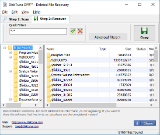
Giveaway of the day — DiskTuna DFR - Deleted File Recovery Portable 1.0
DiskTuna DFR - Deleted File Recovery Portable 1.0 war am 27. November 2016! als Giveaway verfügbar!

DiskTuna DFR - Deleted File recovery ist ein tragbares Tool zum Wiederherstellen von Dateien, das mit FAT, FAT32 und NTFS kompatibel ist.
DiskTuna DFR bringt eure gelöschten Dokumente, Fotos, Archive und weitere Dateitypen zurück - unabhängig davon, ob sich diese auf Festplatten, Memory Cards usw. befinden. Im Unterschied zu anderen ähnlichen Tools versucht es DiskTuna DFR den Wiederherstellungsprozess so einfach wie möglich zu gestalten. DiskTuna DFR ist eine voll funktionale Shareware!
Features:
- Extrem einfach zu benutzen
- Eine Vielzahl an Filteroptionen
- Exzellente Vorschau-Funktion - Vorschaubilder für BMP, JPEG und GIF) werden aus dem Datenstream generiert.
WICHTIGE NACHRICHT VON DEN ENTWICKLER
Extrahiert Dateien auf einen USB-Datenträger und führt die Software von dort aus. Speichert wiederherstellte Dateien nicht auf dem Laufwerk, von dem ihr diese wiederherstellt. Speichert die Software nicht auf dem Laufwerk, wo sich Dateien, die wiederhergestellt werden müssen, befinden. Bitte lest readme.txt durch bevor ihr mit der Installation beginnt.
System-anforderungen:
Windows XP and higher; requires administrative rights for direct disk access
Herausgeber:
Joep van SteenHomepage:
http://www.disktuna.com/fdrhelp/Dateigröße:
5.14 MB
Preis:
$6.95
Weitere interessante Titel

UnserJPEG Repair Service hilft euch beim Reparieren von beschädigten JPEG-Dateien. JPEG ist ein beliebtes Format, das von vielen Digitalcameras und Smartphones verwendet wird. Allerdings wird es oft beschädigt und die Schäden werden erst dann sichtbar wenn ein Bild nicht mehr angezeigt werden kann. Dann heißt es, dass ein Strukturfehler vorliegt: fehlende oder beschädigte 'Marker'.
Der zweite Schadentyp ist der (komprimierte) Bilddatenstream an sich. Obwohl das Bild angezeigt und sogar bearbeitet werden kann, sind die Farben und Teile des Bildes verzerrt.
Wir haben ein Tool zum möglichst effizienten Reparieren entwickelt, obwohl dieser manuelles Bearbeiten binärer Dateien erfordert. Dafür könnt ihr allerdings auch Dateien wiederherstellen, welche für automatische JPG-Reparatur-Tools eine zu große Herausforderung darstellen.
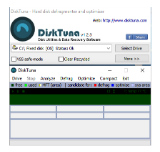
DiskTuna bietet euch ein Freeware-Defragmentierungstool - und daher kommt auch sein Name DiskTuna (Disk-Tuner). Dieses Tool wird nur dann ausgeführt wenn ihr es tatsächlich benötigt. Es installiert keine Hintergrunddienste oder Startup-Schlüssel. Darüber hinaus beinhaltet es eine einzigartige Funktion - die Möglichkeit, 'Jobs' mit Hilfe von selbsterstellten Shortcuts zu starten.
Zum Beispiel: Laufwerk C im Hintergrund defragmentieren, minimieren und nach dem Beenden der Operation schließen. Die Optimierungsfunktion wird Windows-Boot-Zeiten erheblich minimieren und die am häufigsten verwendeten Dateien in dem schnellsten Bereich der Festplatte platzieren. DiskTuna bietet euch einen VSS-sicheren Modus, um den Effekt von Shadow Copies Defragmentierung zu reduzieren.
Einzigartig: DiskTuna legt eine Pause ein, wenn es feststellt, dass die Festplatte zu heiß wird.
Läuft auf Windows XP oder höher und benötigt Adminrechte für direkten Festplattenzugang.
Kommentare zum DiskTuna DFR - Deleted File Recovery Portable 1.0
Please add a comment explaining the reason behind your vote.
Why is it that every undeletion utility always provides those same don't-put-this-on-the-drive-you want-to-recover-from instructions without bothering to make it clear that that only applies if you want to recover files that were deleted before you acquired the software?
The issue there is that when the OS deletes a file, it marks the former contents of that file as free space so, whenever you write something to that volume, there's a chance that it'll overwrite the contents of the deleted file. It's therefore risky to add anything to a volume that contains deleted files you want to recover.
Unless this program does something stupid like write things to its install dir as it's working (and it certainly shouldn't need to do that), it should be perfectly safe to run it from the drive you're recovering from so long as you installed it there beforehand. In fact, it's a good idea to keep one or more undeletion utilities installed on your computer for this very reason. (Annoyingly, these sort of misleading instructions tend to stop people from doing exactly that because they give people the mistaken impression that it's not safe to run such programs directly from the computer's hard disk.)
Apparently, whoever wrote the instructions is making the unwarranted assumption that no one ever acquires the program until after they've accidentally deleted some file(s) that they want back.
In fact, the instructions provided above for this particular program are worse than usual in that they specifically tell you to put the program on a USB flash drive, which means they're making additional unwarranted assumptions regarding both the location of the deleted files and your hardware setup.

Jim Stone,
You are right! If you're not downloading this because you have just deleted a file you need back, then you can download and save it anywhere you want.
Thing is, IF you just deleted some files, I guess a straight forward instruction 'do not install bladibladibla' works better than describing all kinds of conditions and install instructions.
But, yes you are correct.
And I agree with the idea that it's a good idea to keep some undelete tools handy at all times.
Joep
Useless or beyond my abilities :-)
Unzipped on c:\desktop for trial
Deleted one file (....exe from my e:\data partition, emptied recycle bin and immediately set the tunawhatnot to hunt for it. Search did not take long, offering a gigantic mass of retrievable files. OK, narrowed down to *.exe and date.
Dates starts in 2006 (probably when the recovery masterpiece was created). As I knew my file was from early this month I used during previous 31 days. The one single find was not for the file I wanted - so I'll send today's offer where it belongs - the bin.
Sigrid.DE,
Just because a deleted file can not be recovered, it doesn't make this or any other undeleter useless. It made it useless for recovering that particular file.
It is not a given that a deleted file can be recovered. It's something you can try using some undelete software.
Having an undeleter installed, means you have increased your chances of recovering a deleted file. Binning it decreases this chance again.
Successfully downloaded and extracted to my usb drive. As soon as I run setup.exe I get the error message "Setup Has Stopped Working". Will not install for me.

iPhone Angebote »





Android Angebote »





Avira sagt .../temp/setup.exe hat einen TR/crypt.Zpack.gen7 - ja danke !
Save | Cancel