Täglich bieten wir KOSTENLOSE lizenzierte Software an, die ihr sonst bezahlen müsstet!
Giveaway of the day — Leawo PowerPoint to DVD Pro
Leawo PowerPoint to DVD Pro war am 10. April 2011! als Giveaway verfügbar!

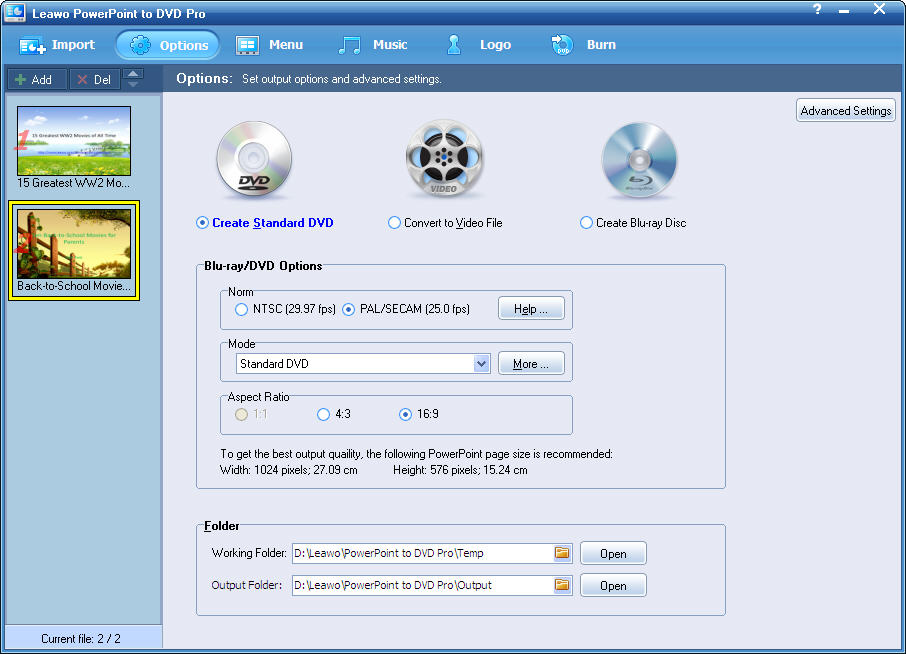
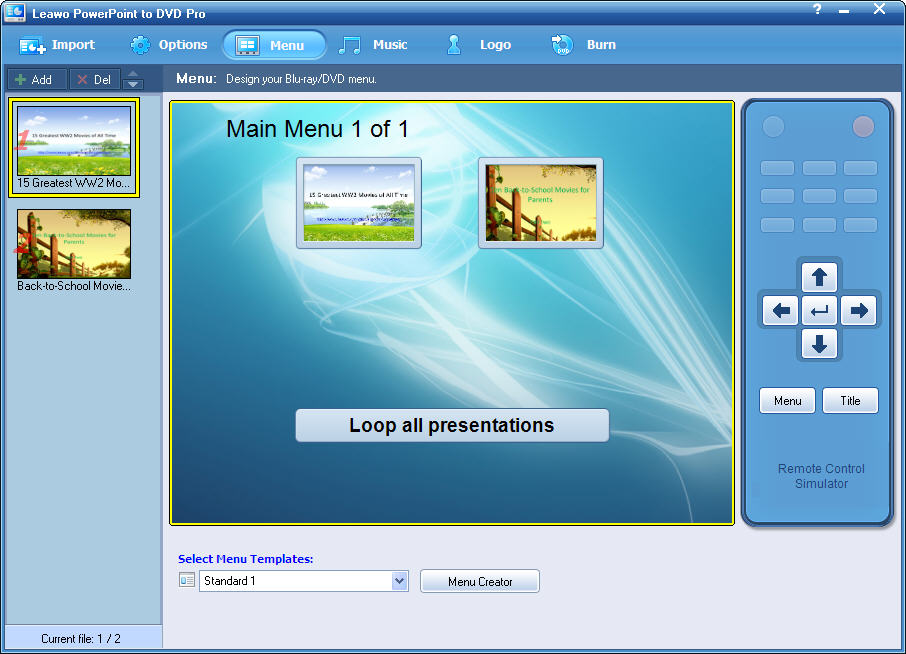
Leawo PowerPoint to DVD Pro ist ein praktischer PowerPoint Konverter, der euch beim Umwandeln von Microsoft PowerPoint-Dateien in fast alle gängigen Videoformate wie z.B. MP4, AVI, FLV sowie zum Brennen auf DVDs/Blu-ray unterstützt. Nun könnt ihr eure Präsentationen oder Slideshows auf DVD/Blu-ray Playern sowie tragbaren Geräten wie z.B. iPad, iPhone, iPod, PSP und auf YouTube hochladen.
Features:
- Konvertieren im Batch-Modus;
- Stimmenaufnahme für DVD, Blu-ray und Video;
- Elegante DVD/Blu-ray Menüs;
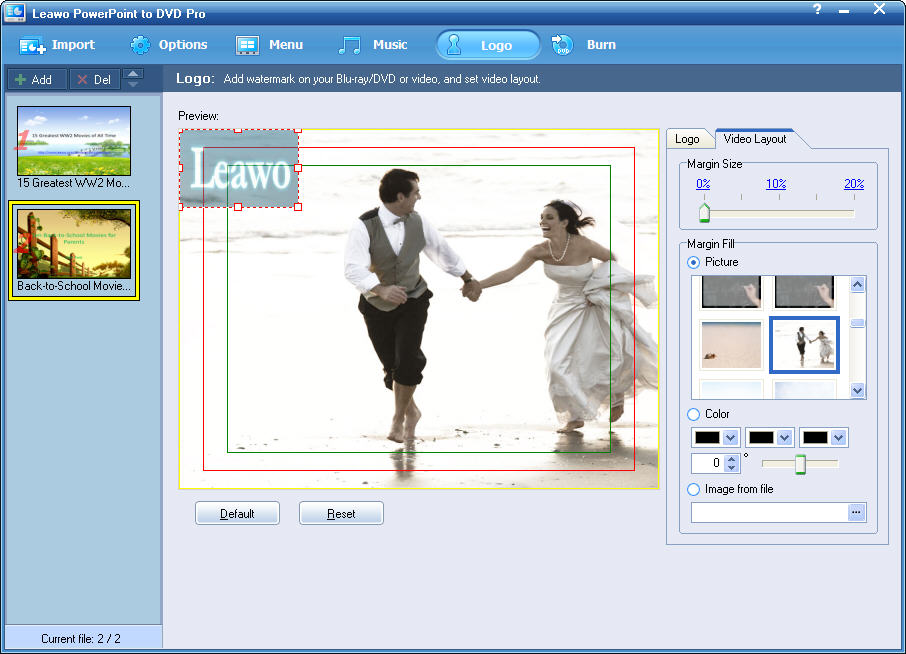
- Möglichkeit, Präsentationen mit eurem Logo zu versehen;
- Alle Animationen, Übergänge, Videos und Sounds der Original - PPT - Datei bleiben erhalten.
System-anforderungen:
Windows XP/ Vista/ 7
Herausgeber:
Leawo SoftwareHomepage:
http://www.leawo.com/powerpoint-to-dvd/Dateigröße:
24.1 MB
Preis:
$79.95
Weitere interessante Titel

Ab sofort habt ihr die Möglichkeit, spielbezogene Videos (Online oder echte Spiele) auf Leawo Facebook Pinnwand hochzuladen und Fanstimmen zu sammeln. 10 Spielvideos mit den meisten “Likes” werden mit Preisen von $29.95 - $99.95 ausgezeichnet!
Leawo PowerPoint to Video Pro unterstützt euch beim Konvertieren von PowerPoint Präsentationen und Slideshows in alle Videoformate zum Hochladen auf Seiten wie YouTube sowie zum Abspielen auf tragbaren Geräten wie z.B. iPad, iPhone, iPod, PSP usw.
Leawo Total Media Converter Ultimate ist eine perfekte 7-in-1 Multimedia-Lösung zum Konvertieren zwischen Audio- und Standard/HD-Videoformaten sowie zum Rippen und Brennen von Blu-rays/DVD-Videos und Herunterladen von Online Videos für alle Playertypen.
Leawo DVD Ripper hilft euch beim Konvertieren von DVDs in Formate wie z.B. AVI, MP4, 3GP, MOV usw. Dieser universelle DVD Konverter ermöglicht euch darüber hinaus das Editieren von Videos!
GIVEAWAY download basket




Kommentare zum Leawo PowerPoint to DVD Pro
Please add a comment explaining the reason behind your vote.
Downloaded and install fine on windows 7 64, however when I try to load/add a power point file, it says power point is not installed on this computer. I have had power pint on this computer for years, My version is 2007 and is up to date. I can use it just fine by itself. How can I get this program to recognize my power point files? Any help will be welcome, Thanks!

System Requirements (according to developer website):
Microsoft PowerPoint Version: 2000/2002/2003/2007/2010
Operating System: Windows 2000/XP/Vista/Win 7
Processor Type: Pentium (500Hz) or above
RAM Capacity: 256MB at least
Available Disk Space: 2GB or larger free space
Additional: DirectX 8.1 or above; DVD writer; Windows-compatible sound card
I thought this would be useful for these of us who are wondering whether this application does require PowerPoint to be installed on the system... Well, it does!
So my first suggestion to the developer is: Please release a version that independently from PowerPoint would just convert the presentation without having to interact with the Office components during conversion.
Thanks to GOTD and developer and happy weekend to everybody.
To function the way ppt2dvd does, you will be needing two different kind of things:
1. something that PPT cannot, like export a presentation to a movie file (PPT 2010 can do that: http://bit.ly/dV6myR ).
2. interpreting the stuff in a PPT-file.
The second point is something PPT can do excellently (one of the things it is made for). PPT gives the standard possibility to 'talk' to it's components. This is called an api-call.
Developers of PPT2DVD did use this feature and only had to develop something for the first point and do the api-call talking to PPT.
This way they did not have to program all the needed interpreting functions in PPT but rather use them by (api-)calling them. This is why you need PPT installed, because it's functions are used.
To ask for a standalone program means you're invinting the programmers to code lots of PPT code that is already present in PPT. Ofcourse they could do that, but it would make the product very much more expensive. A significant less amount of people would pay such an amount for this software.
There is only a small market for the people using this (a few buyers must return all investments). Being very expensive would place the product out of the market (only few people need it). Nobody would be left to buy it. Still, the developer needs to earn his living. Guess you will not see a standalone version this lifetime.
Open Office ca do pretty much the same as PPT can do, but internally it is based on a different coding. It is like a Chinese and an Arab could both be able to write down a recipe to cook potatoes. The dish will be the same but the instructions where different.
This is why api-calling Open Office will not work, it does not understand the api-language of PPT.
Of course the developers could build an alternative to do the same with Open Office.
When people choose between Open Office and PPT there is a huge diffence, because Open office is for free and PPT is a commercial product costing you money.
Just because Open Office is free doesn't mean that the developer has to make his product for free aswell. Like said before, he might be needing to earn a living, like most peole do.
What kind of people are more likely to pay for this add-on, PPT buyers or Open Ofice users (without valuing the different groups in any negative way)?
That is why the developer did not invest his time and money in an add-on for Open Office (users are les prone to buy).
So "YES", you do need PPT.
And "NO", you cannot use PPT2DVD standalone and probably will never be able to do that in the future.
And "NO" again, you cannot use PPT2DVD with Open Office and probably will never be able to do that in the future.
This is it! It really works fine though. I'm very happy with it (using PPT 2007). From PPT 2010 and further this produkt is out of business (A good reason to give it away now or change it into freeware later).
I guess this is not what you like to read, so I kindly ask to vote for me in any way you see fit. It is really your call and I will duefully ignore that :lol:
Downloaded and installed without a problem. Easy to register. The program has a neat, professional-looking interface. I ran the program and converted a simple 25-slide PowerPoint project to an AVI file (couldn't justify wasting a DVD on a test). There was a popup warning about using FFDSHOW.EXE during the conversion but I "allowed it this once" (one of the options). The conversion took several minutes and the resulting 640x480 AVI file was nice looking and about 3x the size of the original file. I have PowerPoint 2007 installed and the program never warned/stated that PowerPoint wasn't installed. The program provides "Help" menu item complete with screen shots and clear explanations including "Getting Started" and "Set Options" and FAQs. Good job. Thumbs up.
I am having exactly the same problem as above. I get a window that tells me to "Repair PowerPoint". It can not find the POWERPOINT.EXE file. I have PowerPoint 2007 installed. I even installed PowerPoint 2010, and had the same results. I would like to use this program.
Any help from Leawo ???
iPhone Angebote »





Android Angebote »





Ohne installiertes MS-Powerpoint geht gar nichts!
Obwohl Powerpoint Präsentationen mittlerweile von vielen kostenlosen Programmen, darunter Open Office, aber auch dem kostenlosen Powerpoint Viewer von MS korrekt unterstützt werden.
Die Vorraussetzung von installierten Powerpoint Komponenten ist eine Bastellösung.
Die entsprechenden Programmkomponenten gehören in das Programm integriert.
Fazit: dilettantisch und für Kaufsoftware unzureichend!
Save | Cancel
Öffnet keine PPSX Dateien.
Save | Cancel
@Paul bist voll dem norton mist verfallen
jeder normale pc-user meidet norton-tools usw.
für deine meinung zu wot wer glaubt wird seelig
Save | Cancel
Ist ja Stark Heute.
"PowerPoint Kino" mal was neues.
Schade leider noch nicht mit 3D Funktion.
Von der Idee her nicht schlecht, die eigenen Präsentationen auf DVD zu bringen und überall abspielen zu können.
Schönes nettes Prog . . .
Save | Cancel
@Thingfinder
Bei WOT kann jeder Dummkopf seine nichtssagende Meinung reinschreiben. Wenn Du wissen willst ob eine Seite sicher ist, dann auf http://safeweb.norton.com
Alle anderen Spinner machen sich sogar noch einen Spaß draus, Seiten negativ zu bewerten!
Save | Cancel
Hmm, ich habe bisher die Videos immer direkt aus Powerpoint 2010 als Windows Media Video (.mmv) gespeichert. Das kann man doch mit einem der letzten 101 Converter von GotD sicherlich konvertieren, oder?
Save | Cancel
Keine meiner diversen total unterschiedlichen PPpräsentationen ließ sich überhaupt nur öffnen geschweige denn irgendwie umwandeln. Wie soll das auch gehen? Automatisches Weiterschalten der Folien??? Auf jeden Fall kamen nur Fehlermeldungen (WinXP SP3). Nun denn, morgen gibt's was anderes.
Save | Cancel
Profis arbeiten mit MS Office und nicht mit Open Office! Jetzt wird's gleich wieder losgehen, das Geheule.
Save | Cancel
Schade, ohne MS-Office Paket nicht zu gebrauchen. Mit Open Office lassen sich auch .ppt Präsentationen erstellen aber das hat der Hersteller wohl noch nicht erkannt.
Insofern Daumen Runter
Save | Cancel
Ein sehr schönes und voll funktionales Programm, das zwar nur auf Englisch ist, was aber kein Problem darstellt. Auf der Oberfläche findet man sch sehr schnell auch so zurecht. Habe es installiert aber noch nicht ausprobiert. Wenn ich das aber richtig verstehe kann man dann auch manuell die Folien weiter klicken. Das habe ich schon lange gesucht, um zB auch Diashows zu machen. Alle Daumen hoch! Weiter so!
Save | Cancel
Die Homepage des Herstellers ist gem. WOT NICHT vertrauenswürdig - sie enthät Malware!!!
Alle Daumen nach unten ohne vorherige Installation!!!
Save | Cancel
Geiles Teil heute!
Save | Cancel
Bevor das große Mosern wieder los geht: Leawo PowerPoint to DVD Pro kann jeder gebrauchen, kommt von einer bekannten chinesischen Weltfirma, ist komplett multilingual, kostet normalerweise nur schlappe $79.95. Es ist sehr einfach zu bedienen, setzt kein PowerPoint voraus, ist mal wieder ein sehr guter und empfehlenswerter Konverter. Eine super Idee, hundert Punkte, alle Daumen hoch und vielen Dank an GAOTD - weiter so!
Save | Cancel
Leawo PowerPoint to DVD Pro ist ein praktischer PowerPoint Konverter -
ja gut wer es braucht. Ein Nischentool, für $80 viel zu teuer. Werde ich mir heute ersparen, weil ich es mit Sicherheit nicht gebrauchen kann. Alle anderen solle sich darüber freuen, eine kostenloses und durchaus nützliches tool heute. Und bevor die ganzen Droftrotteltrolle wieder beleidigend werden, lernt erstmal richtig englisch und seid froh, dass ihr auch heute wieder ein schönes Geschenk bekommt.Alle Daumen hoch und vielen Dank dafür!
Save | Cancel