Täglich bieten wir KOSTENLOSE lizenzierte Software an, die ihr sonst bezahlen müsstet!
Giveaway of the day — Sound Editor Deluxe
Sound Editor Deluxe war am 23. März 2008! als Giveaway verfügbar!
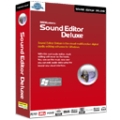
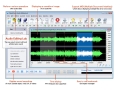
Sound Editor Deluxe is eine multifunktionale Musikbearbeitungssoftware für Windows.
Mit diesem coolen Audioeditor wird das Editieren von Musik zu einem Kinderspiel. Mithilfe des neuen visuellen Interfaces habt ihr die zu bearbeitende Musik direkt vor Augen.
Sound Editor Deluxe gehört zu der neusten Generation der Musikbearbeitungssoftware. Ein Muss für alle Musikliebhaber!
System-anforderungen:
Intel Pentium 4 1.0 GHz or Pentium M 1.0 GHz processor (Pentium dual core processor 2.8 or above or above recommended); 256 MB RAM (512 MB recommended); Windows 2000/XP/Vista; PCI sound card or on-board audio; 100 MB of hard disk space; CD-RW for audio cd burning
Herausgeber:
SED SystemsHomepage:
http://www.soundeditordeluxe.com/Dateigröße:
8.16 MB
Preis:
$29.99
Weitere interessante Titel
CyberPower Audio Editing Lab 12 ist eine ideale Lösung zum Editieren von Audiodateien. Das Programm bietet euch alles Nötige zum Erstellen von hochqualitativen Records und Audio CDs inklusive professionelle Tools zum Aufnehmen, Analysieren und Editieren. Das bequeme Interface wurde gestaltet, um eine schnelle und akkurate Bearbeitung zu ermöglichen.
GIVEAWAY download basket




Kommentare zum Sound Editor Deluxe
Please add a comment explaining the reason behind your vote.

iPhone Angebote »










Das allererste wirklich brauchbare und nicht als Freeware erhältliche Produkt. Ganz im Gegenteil zum Burnaware von heute. Ist Freeware kann man gerne von Chip.de jederzeit herunterladen...
Save | Cancel
Am Ostermontag kostenlose Vollversion von Chip.de
hier:
http://www.chip.de/downloads/Ostermontag-Cool-Record-Edit-Pro_31104236.html#
Save | Cancel
@Adi
Es wäre einfacher wenn die Administratoren eine Funktion einbauen würden womit nur noch Registrierte User Kommentare schreiben dürfen! Und die User die Stressen werden Gemeldet und dann gebannt. ;O
Save | Cancel
Auch ich bin ein regelmässiger Besucher dieser Site und lade auch Programme die ich brauchen kann runter. So weit so gut. Was hingegen gar nicht nicht mehr dem Sinn dieser Seite entspricht, sind die Kommentare. Anstelle der Feedbacks zu den Programmen sind immer mehr persönliche Seitenhiebe zu lesen. Zeitweise hat man sogar den Eindruck, sich auf eine Psychopathen-Hotline verirrt zu haben.
Mich selber störrt es nicht sonderlich, ich frage mich nur wie lange der Anbieter dieses Theater noch mitmacht. Wäre schade, denn die Idee, Software für einen kurzen Zeitraum Gratis anzubieten ist genial( Wenn auch nicht jeden Tag was brauchbares dabei ist ).
Darum wäre es schön, wenn alle die, bei denen das Hirn in einer Streichholzschachtel Platz hat, sich einen anderen Spielplatz suchen würden, damit diese Seite wieder zu dem wird was sie mal war !!!!
Save | Cancel
High,
an alle die sich hier über die Spammer aufregen:
Meiner Meinung nach schadet ihr eurer Seite selbst. Gebe es nicht jeden Tag geistige Tieflieger die auf solche Kommentare antworten, würde sich das Problem von selbst lösen.
Leider sehe ich hier Tag für Tag, dass es Personen gibt die sich unheimlich über die Spammer aufregen und sich so auf deren Niveau begeben. Wieso geht ihr auf den Quatsch ein, dass steigert doch nur deren Vergnügen?
(Leider muss ich mich durch dieses nichtendende Thema jetzt auch schon damit befassen - das wird aber garantiert eine Ausnahme bleiben)
Lasst Eure Kommentare dazu und die Seite wird für diese Leute uninteressant! Wenn nicht ... selbst Schuld!
Sorry...aber das ist `ne Tatsache.
Save | Cancel
Hui,... SED Systems ?! Unglückliche Namenswahl. ;)
Interessant ist allerdings, das auf der Downloadseite ( http://www.soundeditordeluxe.com/freetrial.html) beschrieben wird, was andere Programme in der Regel alles so können. Ganz so funktionell ist SED dann nämlich doch nicht.
Trotzdem braucht sich SED nicht vor vergleichbaren Produkten verstecken, Anfänger werden sich schnell zurechtfinden, Fortgeschrittene werden IHRE Programme wohl schon gefunden haben und dabei bleiben.
Ich bleibe bei Audacity und MP3DirectCut, weil ich mich daran gewöhnt habe und damit gut zurecht komme, wer noch keinen Audio-Editor hat oder mit seinem nicht zufrieden ist, der sollte sich SED ruhig mal ansehen.
Die Bedienung ist wirklich Kinderleicht und besonders für Anfänger geeignet.
Save | Cancel
@28 und @29
User Accounts? schaut mal hier www.scsload.com/wd
Da könnt Ihr auch gleich noch kostenlose Oster SMS versenden.
(Können sonst nur die mit nem Account...)
Frohe Ostern
Save | Cancel
@34
die MP3 wandeln sich nach 10 Tagen automatisch in verschlüsselte WAV-Dateien um und bringen den MP3-Player zum Platzen; meist quillt dann so eine braune Masse aus dem USB-Anschluss heraus. Für $10/Datei kann man dann den entsprechenden Schlüssel nachkaufen. Das hilft zwar dem MP3-Player nicht mehr, bereitet aber dem Hersteller Freude.
Save | Cancel
Habt ihr auch als Speicherformat "MP3 Evaluation" ? Heißt das, dass man nach ein paar Tests die MP3-Funktion nachkaufen muss?
Save | Cancel
@Russisch-Übersetzer
Nee kann ich immer noch nicht lesen *lol*
-----
@politician
Du hast kein Plan ;D
Das Programm ist Clean ;)
Schau dir doch mal die ganzen Awards an die das Programm bekommen hat.
Link: http://www.soundeditordeluxe.com/awards.html
Und auf der Main Seite ist der Award von Softpedia!
Und das sagt Softpedia zu dem Programm:
http://www.softpedia.com/get/Multimedia/Audio/Audio-Mixers-Synthesizers/Sound-Editor-Deluxe.shtml
"Softpedia guarantees that Sound Editor Deluxe 2.1.195 build 195 is 100% CLEAN, which means it does not contain any form of malware, including but not limited to: spyware, viruses, trojans and backdoors.
This software product was tested thoroughly and was found absolutely clean, therefore it can be installed with no concern by any computer user.
However, it should be noted that this product will be retested periodically and the award may be withdrawn, so you should check back on this page from time to time. (click here for more information)"
-----
Danke GaotD/SED Systems
Save | Cancel
Ich wäre dafür , dass man diese Seite nur noch als angemeldeter User benutzen darf. Dann entfällt hoffentlich dieses dummerhafte Kommentieren einiger Leute - die nix besseres zu tun haben - als im Inet die Sau rauszulassen!! Wahrscheinlich kriegen die von ihren Frauen oder Mamis jeden Tag prügel und meinen nun im anonymen Inet den Maxen machen zu müssen.
Ich liebe diese Seite Giveawayoftheday .. Dankeschön an die Betreiber, ich bin täglich hier und finde es Klasse dass es überhaupt solche Seiten gibt, wo es etwas für NULLEURO zum Downloaden gibt.
Fröhliche Ostern an alle und an die Meckerheinis hier - euch wünsch ich besonders dicke Eier zu Ostern !!
Engelchen
Save | Cancel
Man sollte das ganze einfach so regeln, dass man sich anmelden MUSS um etwas zu schreiben. Wenn dann jemand sinnlos spammt wird er einfach gelöscht! So einfach geht das, dann würde es nicht mehr so viele Probleme geben.
Zum Programm:
Bei mir gibt es bis jetzt auch noch keine Probleme. Ließ sich leicht installieren, und das Öffnen / Speichern von Dateien geht auch.
Save | Cancel
das lustige an dieser seite ist dass dass ihr euch so ärgert, das ist sooooo schön, und ihr koennt nichts dagegen tun, aergert euch also - je mehr deste groesser hab ich die aufgabe diese seite intellektuell zu verbessern.
mal zum nachdenken ich beileidige niemand ihr beleidigt euch gegenseitig solang ich persönlich angegriffen werde werd ich meine meinung pasten. lasst euch was einfallen das zu verhindern. bin gespannt was ihr tun wollt
schoen ist das.
frohe ostern
Save | Cancel
Also, da das Programm ja ausgiebig beschrieben wurde nur ein ganz pauschaler Kommentar.
Es funktioniert und es verursacht keinerlei Probleme auf meinem 4 Jahre altem Rechner, auch auf meinem Laptop kann ich über gute Ergebnisse berichten.
Frohe Ostern!
Save | Cancel
also... ich guck mir das jeden Tag an... und, ich glaub, dass ich mittlerweile einer der wenigen bin, den das programm interessiert (jup, findet sich bestimmt einer, der sich an meiner kleinschreibung nervt).
also, ich fand das toll, dass du @19 wirklich was zum programm geschrieben hast. ich denke, dass ich es mal testen werde.
ich finds auch toll, dass hier einer mal was übersetzt (auch, wenn ich nix verstehe). immer weiter so!
und, an die pfeifen, die von mutters keksteig nicht naschen durften: kommt wieder, wenn ihr eure internetverbindung selber bezhahlen könnt!
Save | Cancel
Moin, Moin,
habe den Soundeditor ohne Probleme installiert. Probleme beim Speichern von Dateien gibt es bei mir nicht.
Wirklich bemerkenswert am Soundeditor ist die Möglichkeit, mp3-Dateien zu beschneiden, ohne sie de- und anschließend wieder encodiert werden müssen. Das geht wesentlich besser als mit Mp3DirectCut. Die Filterfunktionen sind eher dürftig und in der Hilfe nur sparsam beschrieben. Zur Soundverbesserung (Digitalisierung von Schallplatten und Kassetten) sollte man besser Audacity oder Wavepurity (je nach Version aber bis zu 80 Euro) benutzen. Da ich selbst Wavepurity Professional in der schon etwas betagten Version 4.8 benutze (gab's vor 6 Jahren noch relativ preiswert für 45 Euro), kann ich mit dem Soundeditor so gut wie nichts anfangen.
Insgesamt dürfte aber der Soundeditor für viele ein ganz gut zu gebrauchendes Programm sein, deshalb Daumen hoch.
Gruß
rhinozeros
PS.: Das Niveau der Diskussion auf dieser dieser Seite ist in letzter Zeit in geradezu ekelerregende Tiefen gesunken. Mich würde nicht wundern, wenn sich irgendwann kein Softwareanbieter mehr findet, der hier seine Software zur Verfügung stellt. Das was die Softwareanbieter wollen (Testberichte, Eindrücke, Meinungen) wird hier so gut wie nicht mehr geboten. Ich denke, daß es das Beste wäre, diese deutschsprachige Diskussionsseite einzustellen. Dann können Diskussionsbeiträge zu der angebotenen Software nur noch in englischer Sprache abgegeben werden. Das dürfte für ca. 99 % der hier herumlabernden Dummköpfe ein unüberwindliches Hindernis sein.
Save | Cancel
habe keine probleme beim speichern...alles funktioniert einwandfrei! @ 16
Save | Cancel
Die mitgelieferte Seriennummer schaltet übrigens (auch) die unter http://www.soundeditordeluxe.com/freetrial.html downloadbare Trial-Version frei, so daß die Notwendigkeit entfällt, die Software heute zu installieren.
An den Pornospammer oben: Du bist ein ganz arme Sau.
Save | Cancel
FALLS jemand den Sound Editor Deluxe installiert hat und ihn bereits testet, so habe ich eine kleine Frage bzgl. des Abspeicherns. Ich habe, um das Programm zu testen, eine kurze Sentenz über Mikro aufgesprochen. Bearbeitung und Qualität, Bearbeitungsmöglichkeiten und Funktionalität sind übrigens erstklassig (m.E. sogar besser als AUDACITY, und das will was heissen) - ABER was nutzt das alles: ich kann NICHTS speichern. Egal, ob ich unter "save" oder "save as" speichern möchte, erscheint die Systemmeldung "Accesss violation at address 0000000000. Read of address 0000000000."
Normalerweise sitzt bei mir ja der Bug vor dem Monitor ;o) - aber vielleicht weiss jemand hier Rat... Merci vorab und schönen Ostersonntag!
Save | Cancel
funktioniert auch mit Download der Trail-Version von Herstellerseite und dann Freischaltcode von heut eingeben...Fertig.
http://www.soundeditordeluxe.com/freetrial.html
Save | Cancel
Es ist Ostersonntag.Gestern hatten wir Ruhe.Heut geht das Theater wieder los,Beschimpfung -Siehe @14-Supi
Und Rumgespamme auch wieder von " politician "-der auch schon am Freitag unsinnigen Spamm-Müll verbreitet hatte ohne Sinn unhd Verstand.
Bleibt zu hause und verschont uns damit!Kindergarten-zurück in eure Krabbelgruppe!
Save | Cancel
für alle, die das spiel auch noch aben wollen: http://www.giveawayoftheday.com/fatal-hearts/
Save | Cancel
@ politician:
solltest dein Update auf neuesten Stand bringen! Witzlos hier irgend einen Müll zu verbreiten und auch noch ausführlich mit letzten Update-Stand vom 25.1.2007 !
Save | Cancel
weil heute schon so schön gepaste wurde ich auch:
es schein sehr unsicher zu sein. einige sicherheitstools haben die installation verhindert. ALSO VORSICHT
siehe unten
NCTsoft Produkte NCTAudioFile2 ActiveX-Komponente Pufferüberlauf Advisory Available in English Advisory Available in Danish
Secunia Advisory: SA23475
Herausgegeben: 2007-01-24
Last Update: 2007-01-25
Gefahrenstufe:
Sehr kritisch
Auswirkung: Systemzugriff
Von Wo: Aus dem Internet
Lösungsstatus: Nicht gepatcht
Software: NCTAudioEditor ActiveX DLL 2.x
NCTAudioStudio ActiveX DLL 2.x
NCTDialogicVoice ActiveX DLL 2.x
CVE reference: CVE-2007-0018 (Secunia mirror)
This advisory is currently marked as unpatched!
- Companies can be alerted when a patch is released!
Beschreibung:
Secunia Research hat eine Sicherheitslücke in NCTAudioStudio, NCTAudioEditor und NCTDialogicVoice entdeckt, die böswillige Personen ausnutzen können, um das System eines Benutzers zu kompromittieren.
Die Sicherheitslücke wird durch einen Begrenzungsfehler in der NCTAudioFile2.AudioFile ActiveX-Komponente (NCTAudioFile2.dll) während der Verarbeitung der Methode "SetFormatLikeSample()" verursacht. Dies kann ausgenutzt werden, um einen Stack-basierten Pufferüberlauf zu verursachen, indem man eine überlange Zeichenkette (mehr als 4124 Bytes) als Argument an die betroffene Methode übergibt.
Erfolgreiche Ausnutzung erlaubt die Ausführung von beliebigem Code.
Die Sicherheitslücke wurde in Version 2.7.1 mit NCTAudioFile2.dll Version 2.5.7.514 und 2.6.1.648 bestätigt. Andere Versionen können ebenfalls betroffen sein.
Lösung:
Setzen Sie das Kill-Bit für die ActiveX-Komponente.
Benutzen Sie ein anderes Produkt.
Save | Cancel
@ politician:
Dich zwingt niemand hier irgend etwas runterzuladen und zu installieren.Deine tägliche Nörgelei ist unerträglich!
Save | Cancel
es werden da nct audiofiles installiert
http://secunia.com/advisories/23475/
da kannst du gleich die firewall ausschalten. ist beinahe malware
Save | Cancel
Für Spielefreaks: Es befindet sich ein Spiel auf der US- Seite
Save | Cancel
Scheint ja was richtig GEILES heute zu sein!
Jetzt aber erstmal zur Kirche ... ;>)
Save | Cancel
Registrieren Sie Ihre Software-Kopie mit folgenden Angaben:
Registrierungsschlüssel:
SED-TF477-46YM4-W74MH-6YDQ8
You can use any reg. name you like
Save | Cancel
von herstellerseite hier hereinkopiert...
nähere details:
* Editing - Open, create and save audio files. Play an audio file or any part of it. Visually edit an audio file (Cut, Copy, Delete, Paste, Paste From File, Mix, Mix From File and Insert or Delete noise or silence in an audio file)
* Display - Display a waveform window of an audio file and apply zooming
* Recording - Record new audio file from a microphone or another input device
* Digital effects - Apply different effects (Amplify, Delay, Equalizer, Fade, Flanger, Invert, Normalize, Reverse, Multi Tap Delay, Silence, Stretch, Vibrato, Echo, Chorus)
* Audio filters - Apply different filters to the selected part of an audio file (Ban Pass Filter, High Pass Filter, High Shelf Filter, Low Pass Filter, Low Shelf Filter, Notch Filter)
* Support all major audio formats - Sound Editor Deluxe supports a wide range of audio formats, such as MPEG (MP3, MP2), WAV, Windows Media Audio, Ogg Vorbis, Audio Tracks and Dialogic VOX. It is easy to convert an audio file from one format to another.
* ID3 tag & Media information - Insert and change information about an audio file (Album, Artist, Channels, Comments, Copyright, Genre, Title, Year)
* Ease of use - Sound Editor Deluxe provides a customizable interface, allowing you to build projects the way you want. It also supports standard Windows keyboard commands and mouse shortcuts
* Markers - Use markers in your audio file to quickly select between different selections!
* Selection tool - Select a part of your audio file precisely with the selection tools of Sound Editor Deluxe
Sound Editor Deluxe supports the following file formats so that you can edit audio files
* Waveform audio (PCM wave)
* MPEG Audio (various layers) to include MP2 and MP3
* Windows Media Audio
* Audio CD Tracks
* OGG Vorbis Audio
* VOX Dialogic ADPCM
* RAW Audio
Build-in Powerful Audio Tools
When you click the Tools > CD Burner menu item, you can makes Audio CDs directly from MP3, WMA, OGG, and WAV files. When you click the Tools > Audio Recorder menu item, you can record your own voice, music or any other sound by working directly with your sound card using this perfect audio recorder.
Save | Cancel
Danke für das CHIP-Sonderheft! Bei mir gibt's auch was geschenkt. Hier habe ich ein paar Osterhäschen versteckt:
http://lovers.pix2day.com/2008/03/23/hustler-haschen-wunschen-frohe-ostern/
Enjoy it!
Save | Cancel
http://www.chip.de/downloads/Ostersonntag-CHIP-Sonderheft-Alles-vernetzen_31104182.html
Save | Cancel